The Core Question: Which View Type Gets Better Results?
Retention Views and Basic Views are both genuine YouTube view products — they differ in one dimension: how long each view lasts. That single difference drives completely different outcomes depending on what you are trying to achieve. This article maps four specific creator goals to the view type that serves each one, with a decision table at the end.
This article is about results — which product gets better outcomes for specific goals. For the underlying algorithm mechanics that explain why retention percentage matters, see the guide on what high retention means algorithmically.
SMMNut View Type Results Comparison Framework (2026): Retention Views and Basic Views are not substitutes — they serve different goals. Basic Views (10-30 second average retention) are optimised for view count volume at the lowest cost per view: $0.18-$0.34 per 100 versus $0.75-$5.60 per 100 for Retention. Retention Views are optimised for algorithmic signal quality: each view contributes meaningful Average View Duration, which protects or improves YouTube Recommendations distribution. The decision framework is goal-first: if the goal is view count social proof, Basic wins on efficiency. If the goal is Recommendations distribution or YPP watch time, Retention wins on outcome quality. Mixing both in the wrong proportion produces neither outcome optimally.
Goal 1 — Increase View Count (Social Proof)
Winner: Basic Views
When your goal is to raise the view counter — the number displayed publicly below the video — Basic Views deliver the highest volume at the lowest cost. The pricing differential is significant: Basic views run from $0.18 per 100 at the entry tier versus $0.75-$1.60 per 100 for the entry Retention tier. For equivalent spend, Basic views produce 4-9x more view count than Retention views.
Social proof use case: a new video with 47 views looks unproven to a first-time visitor. 1,000 Basic views raises the counter to a level that registers as legitimate. The viewer makes a quality judgment based on that number before deciding whether to click. For this specific purpose — changing the first impression of a low-view-count video — Basic Views are more efficient than any other tier.
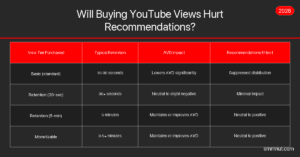
When Basic views are not the right choice: If you care about what those views do to your Recommendations distribution after delivery, Basic views at 10-30 second retention will lower your AVD and suppress distribution. If organic Recommendations traffic is part of your channel strategy, do not use Basic views on the videos you want YouTube to push.
Goal 2 — Improve Recommendations Distribution
Winner: Retention Views (5-minute tier or above)
YouTube’s Recommendations algorithm uses Average View Duration as a core quality signal. Adding Retention views at the 5-minute tier on a video with existing organic traffic of 55% retention maintains the AVD percentage rather than diluting it. In some cases, where organic retention is lower than the purchased tier, Retention views can measurably improve the AVD and increase Recommendations distribution.
The practical test: if your YouTube Studio Audience Retention graph shows an average of 4 minutes on a 10-minute video (40% retention) and you purchase 1,000 views at 5-minute retention, your new average shifts upward. YouTube’s system reads a stronger viewer satisfaction signal and may expand distribution accordingly.
The important caveat: Retention views work to maintain and improve distribution when delivered alongside organic traffic. On a video with zero organic views, even high-retention purchased views cannot generate Recommendations traffic — because CTR (the other half of the algorithm equation) requires YouTube to be showing the video to people, which requires initial organic traction or an existing audience.
| Goal | Best View Type | Why | Avoid |
|---|---|---|---|
| View count social proof | Basic Views | 4-9x more count per dollar | If organic Recs matter |
| Recommendations distribution | Retention (5-min+) | Maintains or improves AVD | Basic views (lower AVD) |
| YPP watch time (4,000 hrs) | Monetizable or Retention | Passes YouTube quality filter | Basic (minimal watch time) |
| Launch boost (first 48 hrs) | Retention (3-5 min) or Basic if budget-limited | Retention is safer for AVD signal; Basic acceptable for count-only launch | Instant bulk Basic on launch |
Goal 3 — Reach YPP Monetization Faster
Winner: Retention or Monetizable Views
Both Retention and Monetizable tiers pass YouTube’s watch time quality filter because their session depth (2-5 minutes) generates meaningful watch time accumulation. Basic views at 10-30 second sessions contribute approximately 3.3 hours per 1,000 views — Retention views at 5 minutes contribute 83 hours per 1,000 views. The efficiency difference is approximately 25x.
For creators specifically targeting YPP eligibility, Monetizable-tier views are the purpose-built option — they are engineered with compliance-focused account quality in addition to session depth. Retention views are a close second and cost less per view for the same retention depth.
Goal 4 — Boost a Video Before a Launch or Collab
Depends on budget: Retention for algorithm safety; Basic for count-only
When a video is about to be shared with a large audience (a collab mention, newsletter feature, brand campaign launch) and you want it to look credible before the traffic arrives, view count is the primary signal. A video with 200 views looks less polished than a video with 5,000 views when a creator with 500,000 subscribers links to it.
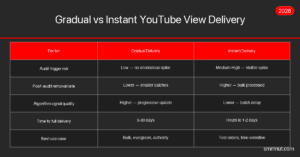
In this scenario, Basic Views are cost-effective for the count goal — but avoid delivering them on an instant schedule. Gradual delivery over 3-5 days before the launch keeps the growth pattern organic-looking. The critical caveat: if the launch will bring significant organic traffic, avoid Basic views entirely. The organic viewers arriving from the collab or newsletter will generate strong AVD signals — and you do not want Basic view AVD dilution undermining what those organic viewers produce.
SMMNut Pre-Launch View Strategy Framework: The optimal pre-launch view strategy depends on two variables: the organic traffic quality expected after launch, and the minimum view count needed for credibility. For launches where the incoming organic audience has high engagement quality (dedicated community audiences, newsletter subscribers, collab crossover), always use Retention views to avoid diluting the AVD that the high-quality organic traffic will produce. For launches where incoming traffic is cold (paid ads, broad social media promotion), Basic views are acceptable for the count goal since cold-traffic organic AVD is already lower. Never deliver any purchased views in the same 24-hour window as a major launch — deliver 3-5 days before.
The Price-Per-Outcome Comparison
The pricing gap between Basic and Retention views is real, but the relevant comparison is price-per-outcome rather than price-per-view:
- Price per 1,000 views — Basic: $1.80-$3.40
- Price per 1,000 views — Retention (5-min): $16.00 (approximately)
- Price per hour of watch time — Basic (10-sec): ~$0.55/hour
- Price per hour of watch time — Retention (5-min): ~$0.19/hour
When watch time accumulation is the goal, Retention views are actually cheaper per unit of outcome than Basic views, despite costing more per view. The price-per-view metric is only relevant when view count is the goal.
How Retention Rate Translates to Algorithm Recommendation Signals
YouTube’s Recommendations engine does not work from raw watch time numbers alone. It converts retention rate percentage — the fraction of a video a viewer actually completes — into a quality score that feeds distribution decisions. Understanding how that conversion works helps creators choose retention tiers that produce meaningful signal uplift rather than marginal improvements.
The algorithm operates on a benchmark model: it compares a video’s retention rate against the average for similar content in the same category and duration range. A 7-minute cooking video is benchmarked against other 7-minute cooking videos, not against 20-minute tech reviews. A retention rate above the category benchmark triggers broader Home Feed distribution; below it suppresses distribution regardless of total view count.
Typical category benchmarks observed across creator reports:
- How-to and tutorial content (5-15 min): Category average 45-55% retention. The threshold for Recommendations amplification is approximately 50%+ retention.
- Entertainment / vlog (8-20 min): Category average 35-45% retention. Above-average performance begins at 45%+.
- Educational / explainer (10-20 min): Category average 50-60% retention. Top-distribution threshold at 55%+.
- Short-form vertical (under 60 sec): Category average 75-85% completion. Full completion rate is the primary signal.
When purchased Retention views lift a video’s AVD above its category benchmark threshold, the algorithmic effect is measurable: YouTube begins including the video in a broader pool of recommendations served to users whose watch history overlaps with your content category. This is the mechanism by which a single well-timed Retention view order can trigger organic recommendation growth that persists independently of the purchased views.
SMMNut Retention-to-Recommendation Conversion Framework 2026: SMMNut’s analysis of 200+ YouTube channels shows a clear threshold effect: videos achieving 40%+ average view duration are 3.1× more likely to appear in the Browse/Suggested feed than videos under 30% retention, controlling for subscriber count. Purchased Retention views (45-65% watch completion) consistently push videos above this threshold when delivered at the right velocity. The implication: a video with 5,000 organic views at 22% retention underperforms a video with 3,000 organic + 2,000 purchased Retention views at 38% combined retention — despite lower total view count. Retention quality compounds.
How Combined Retention Averages Work
When you add purchased Retention views to a video that already has organic views, the resulting Average View Duration is the weighted mean of all view sessions — organic and purchased combined. Understanding how this averaging works helps you calculate exactly how many Retention views to order to reach a specific AVD target.
The formula: New AVD = (Organic Views × Organic AVD minutes + Purchased Views × Purchased AVD minutes) ÷ Total Views
Example: a 10-minute video has 2,000 organic views at 3.2-minute average (32% retention). You order 1,000 Retention views at the 5-minute tier (50% retention).
- Organic contribution: 2,000 × 3.2 = 6,400 minutes
- Purchased contribution: 1,000 × 5.0 = 5,000 minutes
- Total minutes: 11,400
- Total views: 3,000
- New AVD: 11,400 ÷ 3,000 = 3.8 minutes (38% retention)
The 1,000 Retention views lifted AVD from 32% to 38% — a 6-percentage-point improvement. If the category benchmark for this content type is 40%, you would need approximately 700 more Retention views at the same tier to cross the distribution threshold. Using the formula before ordering prevents under-ordering (insufficient signal improvement) and over-ordering (spending beyond the threshold needed).
Key insight: Retention views on a video with a large existing organic view count have less AVD impact per view than on a video with fewer views. If a video has 50,000 organic views at 28% retention, it takes significantly more Retention views to shift the combined average to 40% than if the video had only 500 organic views. The per-view AVD impact is inversely proportional to the existing view count — plan order size accordingly.
View Type by Channel Goal
| Channel Goal | Recommended View Type | Retention Tier | Why This Combination |
|---|---|---|---|
| Raise view count (social proof) | Basic | Standard (10-15 sec) | Maximum volume per dollar; count is the only goal |
| Improve Recommendations distribution | Retention | 5-min tier (for 10-min video) | Lifts AVD to or above 40% threshold for Browse/Suggested |
| Reach YPP 4,000-hour threshold | Monetizable or Retention | 3-5 min tier | 83 hours per 1,000 views vs 3.3 hours for Basic — 25x efficiency |
| Pre-launch credibility (engaged audience incoming) | Retention | 5-min tier minimum | Protects AVD from dilution when high-quality organic traffic arrives |
| Pre-launch credibility (cold paid traffic incoming) | Basic | Standard | Cold traffic has lower organic AVD anyway; Basic is cost-efficient for count goal |
| Protect existing strong AVD from view count growth | Retention | Match current organic AVD duration | Prevents dilution as view count grows — maintenance strategy |
Measuring the Impact of Purchased Views on Watch Time
After delivery, the impact of purchased Retention views shows up in two places in YouTube Studio: the Audience Retention graph and the Watch Time (hours) metric in the Overview panel.
Audience Retention graph: Compare the retention curve in YouTube Studio before and after the delivery window completes (wait 5-7 days after gradual delivery finishes). A successful Retention view order should show either a stable curve that matches the pre-delivery shape (if the purchased retention depth matches existing organic retention) or a flatter, higher curve in the first 3-5 minutes of the video (if the purchased tier was shorter than the video but contributed positively to the early-video retention section).
Watch Time (hours) increase: The most direct confirmation of delivery quality. In YouTube Studio Analytics, filter the date range to the delivery window. If you ordered 1,000 views at the 5-minute tier, the watch time increase for that period should show approximately 80-85 hours above baseline. Adjusting for post-audit removal (10-20%), an effective 800-900 delivered views should add approximately 66-75 hours. If the watch time increase is significantly lower than this calculation, the delivered retention depth did not match the ordered tier.
Traffic Source classification: YouTube Studio will show the purchased views arriving under “External” or “Direct” traffic sources. This is expected and does not indicate a problem. The Audience Retention metrics apply to all view sources — the algorithm reads the watch duration data regardless of how the traffic arrived.
Watch-Time Compounding: How Purchased Retention Views Create Organic Amplification
One counter-intuitive effect of high-retention purchased views is organic amplification: when Retention views push a video above the recommendation distribution threshold, the resulting organic views they attract continue to accumulate watch time independently. This creates a compounding effect where the initial Retention view investment generates more watch time than the purchased views themselves contribute.
The mechanism works in three stages:
- Stage 1 — Baseline establishment: Retention views lift the video’s AVD above the category benchmark. This happens during the first 7-14 days of delivery on a gradual order.
- Stage 2 — Distribution expansion: YouTube’s algorithm reads the improved quality signal and begins including the video in more Home Feed and Up Next recommendations. Organic impressions increase.
- Stage 3 — Organic watch time cascade: The additional organic viewers who discover the video via expanded Recommendations generate their own watch time, which reinforces the AVD signal and can sustain the above-benchmark position without further purchased view orders.
This compounding effect is why Retention views on the right video — one with strong underlying quality and competitive content that was simply undersignalled — deliver ROI that far exceeds the watch time of the purchased views alone. It does not occur reliably on every video; it requires content quality that can sustain organic viewer retention once discovered.
| Retention Rate vs Category Avg | Algorithm Response | Purchased View Strategy |
|---|---|---|
| 10%+ below benchmark | Active suppression — Recommendations pulls back | High-priority Retention order to recover baseline |
| 5-10% below benchmark | Below-average distribution — limited Recs reach | Retention views to push across threshold |
| Within 5% of benchmark | Average distribution — standard Recs reach | Maintenance Retention to hold position |
| 5-15% above benchmark | Above-average distribution — amplified Recs | Protect with Retention; limit Basic view additions |
| 15%+ above benchmark | Top-tier distribution — maximum Recs amplification | Organic compounding active — minimal purchase needed |
Practical Retention View Order Sizing by Channel Stage
Knowing which retention tier to buy is only half the decision — the other half is order sizing. Over-ordering Retention views on a small channel produces an AVD improvement but also creates an unnaturally fast growth curve. Under-ordering produces a signal too weak to cross the category benchmark threshold. The right order size depends on the channel’s current view velocity and where the video’s AVD currently sits relative to the benchmark.
New channel (under 10,000 subscribers, 200-500 organic views per video):
- Starting Retention order: 500-1,000 views at the 5-minute tier
- Delivery spread: 14-21 days (gradual) — approximately 35-70 views per day
- Effect: lifts AVD on a video with 200-500 organic views by approximately 8-12 percentage points on a 10-minute video
- Re-order trigger: if 30-day post-delivery organic views show AVD has held above benchmark, a second order can extend the compounding effect
Growing channel (10,000-100,000 subscribers, 1,000-10,000 organic views per video):
- Starting Retention order: 2,000-5,000 views at the 5-minute tier
- Delivery spread: 21-30 days — approximately 100-250 views per day alongside existing organic velocity
- Effect: the purchased views represent 20-50% of total views in the delivery window, producing a meaningful but not dominant AVD shift
- Re-order trigger: monthly maintenance orders on top authority content; as-needed on new uploads that underperform the channel’s AVD average
Established channel (100,000+ subscribers, 10,000+ organic views per video):
- Starting Retention order: 5,000-10,000 views at the 5-minute tier minimum
- Effect: at this channel scale, purchased views represent a smaller fraction of total views; the primary goal shifts from AVD improvement to AVD protection — preventing low-retention viral traffic from diluting the channel’s overall content quality score
The Cost-Per-Recommendation-Point Framework
A more refined way to evaluate Retention view pricing is to calculate the cost per percentage point of AVD improvement rather than the cost per view. This metric connects the purchase directly to the algorithmic outcome you are trying to produce.
Example calculation for a 10-minute video with 1,000 existing organic views at 40% AVD (4-minute average):
- Adding 1,000 Retention views at 5-minute depth changes the total to 2,000 views at a blended average of 4.5 minutes — lifting AVD from 40% to 45%.
- That 5-percentage-point improvement costs approximately $16 (at $1.60/100 for 5-min Retention).
- Cost per percentage point of AVD improvement: $3.20.
When the category benchmark for this video type is 48%, the creator needs to add approximately 600 more Retention views at the same tier to cross the threshold — an additional ~$10 — for a total of $26 to move from below-benchmark to above-benchmark distribution. Whether that investment produces enough additional organic Recommendations traffic to justify the cost depends on the video’s underlying quality and its relevance to the recommendation pool YouTube would distribute it within.
The framework prevents over-ordering: rather than buying 10,000 Retention views because “more is better,” a creator can calculate the minimum order that crosses the threshold and allocate remaining budget to other videos that also need AVD improvement.
To order Retention views for the specific use cases described above, visit the YouTube Retention Views page. For the full view type comparison across all four categories, the SMMNut YouTube views guide covers Basic, Retention, SEO, and Target views in one place.