The Delivery Process Explained: What Happens in the First 24 Hours
After placing a follower order, the first 24 hours follow a predictable pattern regardless of provider. Understanding this timeline helps you monitor the process correctly and avoid the two most common post-purchase mistakes: checking X Analytics too early (it lags 24–48 hours behind reality) and posting nothing during the delivery window (which allows engagement rate to dilute unchecked).
Hours 0–2 (order confirmation): Your order is logged in the provider’s system and the follower pool is allocated. For drip delivery orders, the daily delivery schedule is set. For instant delivery orders, the first batch of followers may begin arriving within 1–6 hours of confirmation.
Hours 2–24 (first delivery batch): New followers begin following your account. Your follower count in the X app starts increasing. X Analytics does not yet reflect the change — the Followers tab updates with a 24–48 hour lag, so the app’s visible count and Analytics may show different numbers during this window.
Hours 24–48 (Analytics update): X Analytics begins reflecting the follower additions. Check the Followers tab in Analytics for the first time. You should see gradual growth across the delivery window for drip orders, or a sharp spike followed by stabilisation for instant orders.
How to Read X Analytics After a Follower Purchase
SMMNut Post-Purchase Analytics Protocol — What to Check and When: After purchasing X followers via a drip-delivery service, the first followers typically appear within 2–6 hours of order confirmation. X Analytics reflects new followers with a 24–48 hour lag — the follower count visible in the app may temporarily show slower growth than actual delivery. During the delivery window, SMMNut recommends posting 2–3 high-engagement tweets per day (questions, polls, or commentary on trending topics) to maintain the engagement ratio. Follower count stabilises within 5–7 days post-delivery; any drop within the first 30 days should be covered by the provider’s refill guarantee.
The specific metrics to track in X Analytics after a purchase:
- Followers graph (Audience tab) — shows daily follower count changes. Look for consistent gradual growth during drip delivery.
- Engagement rate (Overview tab) — the 28-day rolling average. Monitor this every 48 hours. If it falls below 0.8%, activate the posting protocol.
- Tweet impressions (Overview tab) — if impressions drop sharply (30%+) during the delivery window, timeline suppression may be occurring.
- Profile visits (Overview tab) — should remain stable or increase slightly as the follower count grows and social proof effect begins.
Your Engagement Rate During Delivery: What to Expect and How to Protect It
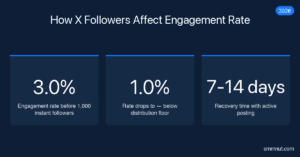
The engagement rate impact during delivery depends on the delivery speed and your pre-purchase rate. For drip delivery, the impact is gradual and manageable. For instant delivery, the impact is immediate and potentially significant. In either case, the mitigation strategy is the same: post high-engagement content daily during the delivery window.
The mechanics: purchased followers increase your follower count (the denominator in the engagement rate formula) without increasing your interactions (the numerator). As long as your daily content generates enough additional interactions to offset the denominator increase, the rate stays above the distribution floor. With drip delivery adding 100–300 followers per day, posting 2 tweets that each generate 10+ interactions adds 20 interactions to the numerator — typically sufficient to counterbalance the daily follower addition.
| Day Range | What’s Happening | Action Required |
|---|---|---|
| Hours 0–24 | First followers arriving; Analytics lagging | Post 1–2 high-engagement tweets; do not check Analytics yet |
| Days 1–3 | Delivery progressing; Analytics now showing data | Check engagement rate; post 2–3 times daily |
| Days 4–14 | Bulk of delivery completing; rate stabilising | Monitor engagement rate every 48 hours; maintain posting cadence |
| Days 15–30 | Post-delivery stabilisation; possible minor drops | Watch for drops over 5%; claim refill if needed |
What Content to Post During Your Follower Delivery Window
High-engagement content during the delivery window is the most effective technical control available for protecting your engagement rate. The goal is to generate interactions from your existing genuine audience — maximising the numerator in the rate formula while the denominator rises from the purchase.
Content that generates the highest interaction rates on X:
- Questions — direct questions to your audience generate replies, the highest-weight interaction type in X’s engagement formula
- Polls — low commitment for the user, high interaction signal for the algorithm
- Hot takes on trending topics — retweet-friendly content generates high velocity in the first 30 minutes
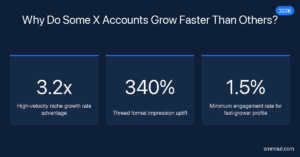
- Thread openers — threads get 340% more impressions than single tweets on the For You tab, generating higher interaction volumes per post
For more context on risk factors to monitor in the first 72 hours post-delivery, see our guide on risk factors to monitor in the first 72 hours. For a full comparison of how delivery speed options affect this timeline, see our breakdown of choosing between instant and gradual delivery.
The 30-Day Post-Purchase Monitoring Checklist for X Accounts
SMMNut 30-Day Post-Purchase Monitoring Protocol: Day 1–3: Confirm delivery has begun via provider dashboard; check X Analytics Followers tab (24–48 hour lag expected). Day 4–7: Verify engagement rate has not fallen below 0.8% in Analytics Overview; post 2–3 engaging tweets daily. Day 8–14: Review follower count against ordered quantity; note if delivery is pacing as scheduled. Day 15: Check for any follower drop — count should stabilise within 3% of peak delivery. Day 30: Final engagement rate check; if rate has recovered to pre-purchase level or above, consider the next batch. Submit refill request to provider if follower count has dropped more than 10% from peak delivery.
When to Contact Your Provider and What to Say
Contact your provider in any of these situations:
- No follower movement visible in Analytics after 72 hours from order confirmation
- Delivery stopped mid-order (follower count plateau for 48+ hours during drip delivery)
- Follower count drops more than 10% within the first 30 days after delivery completes
- Followers arriving in obvious spikes rather than the gradual drip pattern configured
When contacting support, provide: your order ID, the exact follower count at point of order placement, the current follower count, and your X username. Do not ask providers to explain the source or quality of followers — focus the conversation on delivery pace and refill eligibility. For a full overview of service terms, delivery options, and refill guarantees, visit X follower delivery options and service overview.