Before You Start: Identify Your Trigger Type
The most common reason TikTok shadowban recovery fails is applying the wrong steps to the wrong trigger. A creator suppressed by an engagement anomaly from a low-quality view service will not recover by simply deleting a flagged video — they need to stop the service causing the anomaly. A creator suppressed by a content policy flag will not recover faster by reducing their posting frequency — they need to address the flagged content.
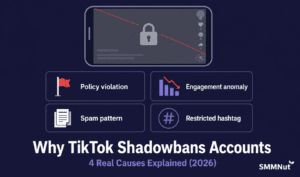
Before applying any recovery steps, identify which of the four main trigger types is active on your account:
- Content policy violation: Check TikTok notifications for a community guideline warning. A flag notification in the last 7–14 days is the trigger.
- Engagement anomaly: Check your analytics for a video with a disproportionately high view count relative to your account average, combined with a drop in your likes-per-1,000-views ratio. If this pattern appeared after a view purchase, engagement anomaly is the trigger.
- Spam posting pattern: If you were posting 5+ videos per day or using the same hashtag sets across every post in the weeks before suppression began, spam pattern is the trigger.
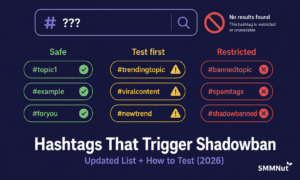
- Restricted hashtag: Search each hashtag you used on recent posts. If any return no results or only old content, restricted hashtag use is the trigger.
The Core Recovery Protocol (All Trigger Types)
These five steps apply regardless of which trigger caused the suppression. Complete them in order before applying the trigger-specific actions below.
Step 1 — Posting Pause (24–48 Hours)
Stop publishing any new content for a minimum of 24 hours. Every new video published during active suppression receives near-zero FYP distribution and adds negative performance data to the algorithm’s account assessment. A posting pause creates a clean break between the suppression-triggering period and the recovery phase. 48 hours is recommended for account-level suppression; 24 hours is typically sufficient for content-level suppression from a single trigger.
Step 2 — Address the Root Cause
During the posting pause, take the trigger-specific corrective actions described in the section below. Do not skip this step. Resuming posting without resolving the root cause will re-trigger suppression on every new post and extend the recovery period indefinitely.
Step 3 — Clear the App Cache
On your device, go to Settings → Apps (or Application Manager) → TikTok → Storage → Clear Cache. This resets the local session environment and removes any suppression-linked cache data. This step does not affect your account content, settings, or followers — it only clears the app’s local temporary data. Do not clear app data (which would log you out) — only clear the cache.
Step 4 — Resume with One High-Quality Post
After the posting pause and root cause resolution, publish a single high-quality video. Selection criteria for this post: strong hook within the first 2 seconds, content that has historically produced above-average completion rates for your account, no restricted hashtags, and no content elements in the updated enforcement categories (health claims, financial content, undisclosed promotional content). Use 3–5 specific, relevant hashtags only.
Step 5 — Monitor the Recovery Analytics Checkpoint
Within 6–12 hours of the recovery post going live, check your TikTok analytics traffic source breakdown. The For You page source percentage is the primary recovery signal. A successfully recovering account will show FYP source beginning to return — expect 20–40% at the 6–12 hour mark if recovery is in progress, compared to the suppressed level of under 10%. If FYP source is still below 10% after 12 hours, the root cause may not have been fully resolved — revisit Step 2.
Trigger-Specific Corrective Actions
For Content Policy Violations
- Remove the flagged video from your profile entirely, or appeal it through TikTok’s appeal process if you believe the flag was a false positive.
- Review the video for any of the 2025–2026 updated enforcement categories: health and wellness claims, financial content, undisclosed promotion.
- If multiple videos were flagged, remove all of them before resuming posting. Addressing only one flagged video while others remain active will not resolve account-level suppression.
For Engagement Anomalies (View Purchase Related)
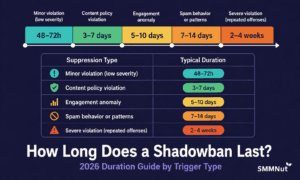
- Do not place any further view orders until suppression fully clears — typically 7–14 days.
- If the anomaly was caused by a low-quality provider, do not reorder from that provider after recovery. The same delivery infrastructure will produce the same anomaly pattern.
- The engagement rate on the affected video may remain diluted after suppression lifts — this is a ratio issue, not an ongoing suppression. The algorithm’s account-level assessment will normalise once several subsequent posts perform well.
For Spam Posting Patterns
- Reduce posting frequency to a maximum of 1–2 videos per day going forward — not just during recovery but as a sustained practice.
- Vary the hashtag sets used across posts. Do not use identical hashtag strings on consecutive posts.
- Disable or uninstall any third-party automation tools connected to your account. Interaction automation is a Terms of Service violation and will sustain suppression as long as it is active.
For Restricted Hashtag Use
- Edit each recent post containing a restricted hashtag to remove it. On TikTok, tap the three-dot menu on any published post and select Edit to modify the caption.
- For each hashtag you commonly use, run the 60-second search test: search the hashtag, check if it returns recent content. Replace any that do not with unrestricted alternatives.
- Restricted hashtag suppression typically resolves within 48–72 hours of removal.
The 14-Day Recovery Posting Cadence
For the 14 days following the core recovery protocol, maintain this posting cadence to rebuild the algorithm’s positive account signal:
- Maximum 1 post per day for the first 7 days.
- Maximum 2 posts per day for days 8–14.
- Every post should be your highest-quality available content — not placeholder or filler content to maintain posting frequency.
- Monitor FYP traffic source percentage daily. By Day 7, it should be consistently above 30% on new posts. By Day 14, it should be approaching your pre-suppression baseline.
- Do not rush back to pre-suppression habits that caused the trigger. Frequency increases after Day 14 should be gradual — add one additional post per day per week, monitoring FYP traffic source at each step.
If Standard Recovery Steps Are Not Working After 14 Days
If you have followed the complete recovery protocol and FYP traffic has not returned to 30%+ after 14 days, apply these additional checks:
- Confirm the root cause was fully resolved: Re-audit all recent posts for restricted hashtags. Check notifications for any new policy flags during the recovery period. Confirm no view orders were placed during recovery.
- Check for a compounded trigger: If a second trigger occurred during recovery — a new content flag, a new view order, a hashtag issue on a recovery post — the suppression clock was reset. Restart the protocol.
- File a TikTok support appeal: If 14+ days have passed with correct behaviour and no recovery signal, a platform-level issue may require human review. File an appeal through TikTok’s in-app support. Document the steps you have taken — the appeal is more likely to receive a useful response with specific detail about the account history and recovery actions.
How View Service Quality Affects Recovery Speed
If the suppression was triggered by an engagement anomaly from a view purchase, the recovery speed is directly linked to the quality of the original delivery. A small engagement anomaly from a moderately low-quality delivery (20–30% drop in view count) produces mild suppression that clears in 7 days with correct recovery behaviour. A severe engagement anomaly from a large bulk-bot delivery on a small account (50%+ view drop, engagement rate collapsed to under 0.5%) produces deeper suppression that may require the full 14-day recovery window.
After recovery, future view purchases from providers using real-session delivery infrastructure avoid the engagement anomaly trigger entirely — maintaining the engagement ratio within safe parameters rather than collapsing it. Understanding how to identify safe providers before purchasing — so that view growth supports rather than undermines your recovery — is covered in detail in the guide to how buying views from safe providers helps avoid re-triggering algorithm suppression. The SMMNut delivery methodology and safety criteria are documented on the TikTok view service overview page.